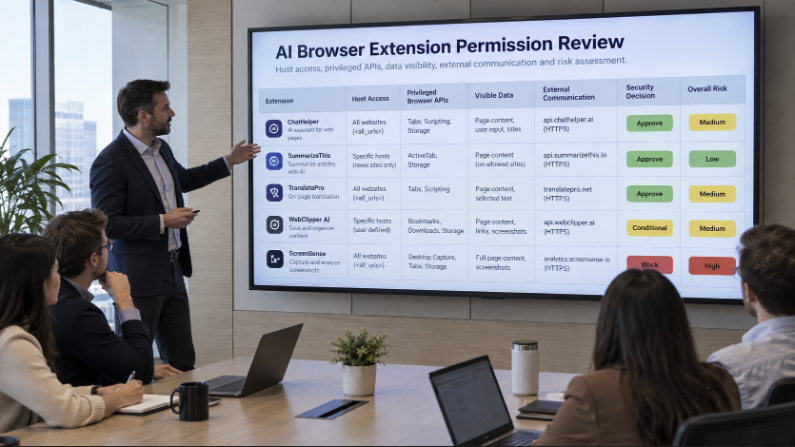
AI browser extensions should be governed as data and identity paths, not just browser add-ons.
Employees can install AI extensions quickly for writing, research, coding, meeting notes, summarization, and sales workflows, often without traditional procurement review.
The main risk is that an extension may run inside a browser session where the user is already authenticated to sensitive systems.
Security teams need to continuously discover AI-related extensions across Chrome, Edge, Firefox, and managed browser environments.
Extension review should include extension ID, publisher, version, install source, active users, permissions, host access, browser profile, and device context.
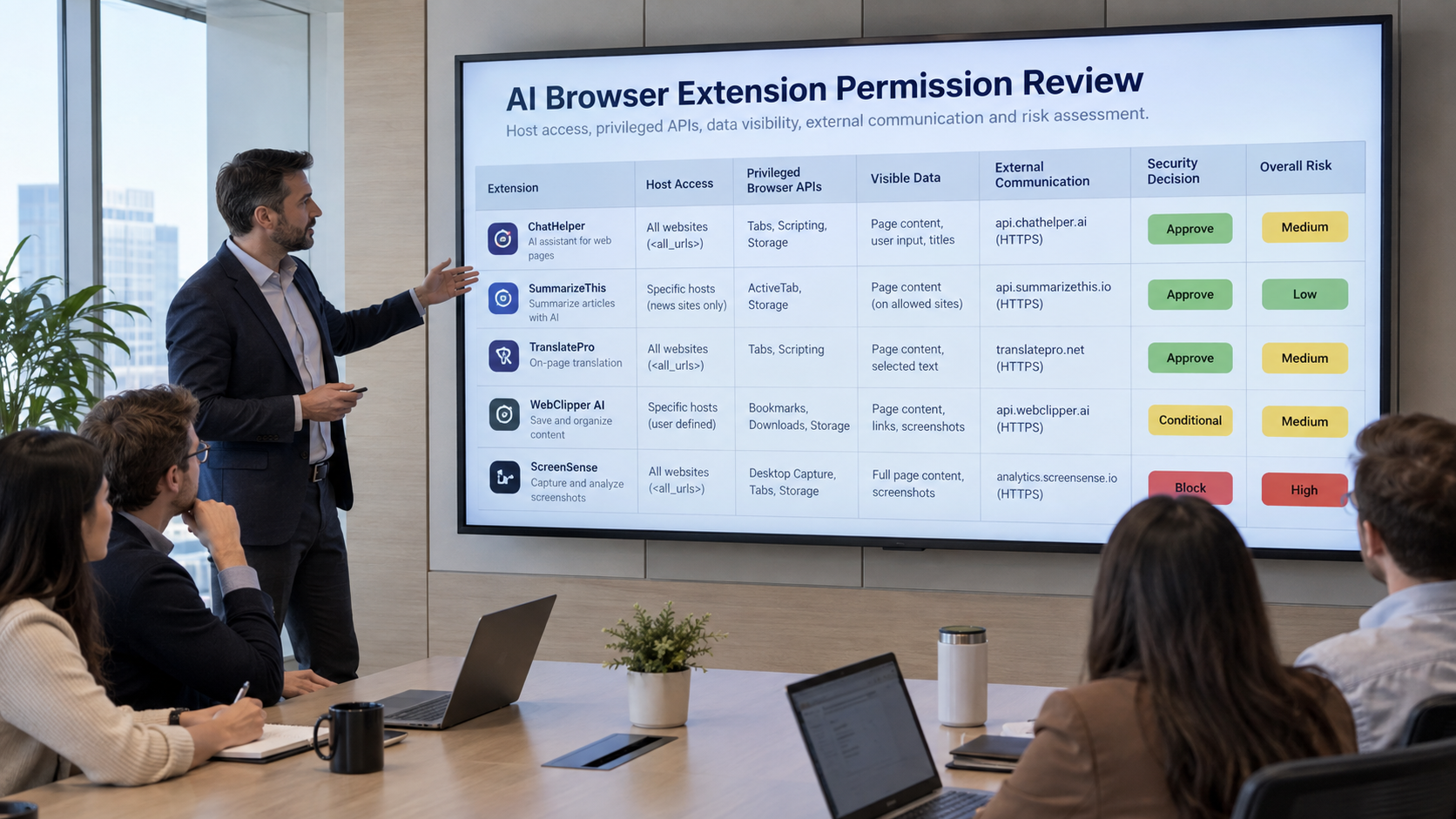
Broad host permissions, privileged browser APIs, content scripts, clipboard access, tabs access, cookies, downloads, storage, scripting permissions, and web requests should all trigger deeper review.
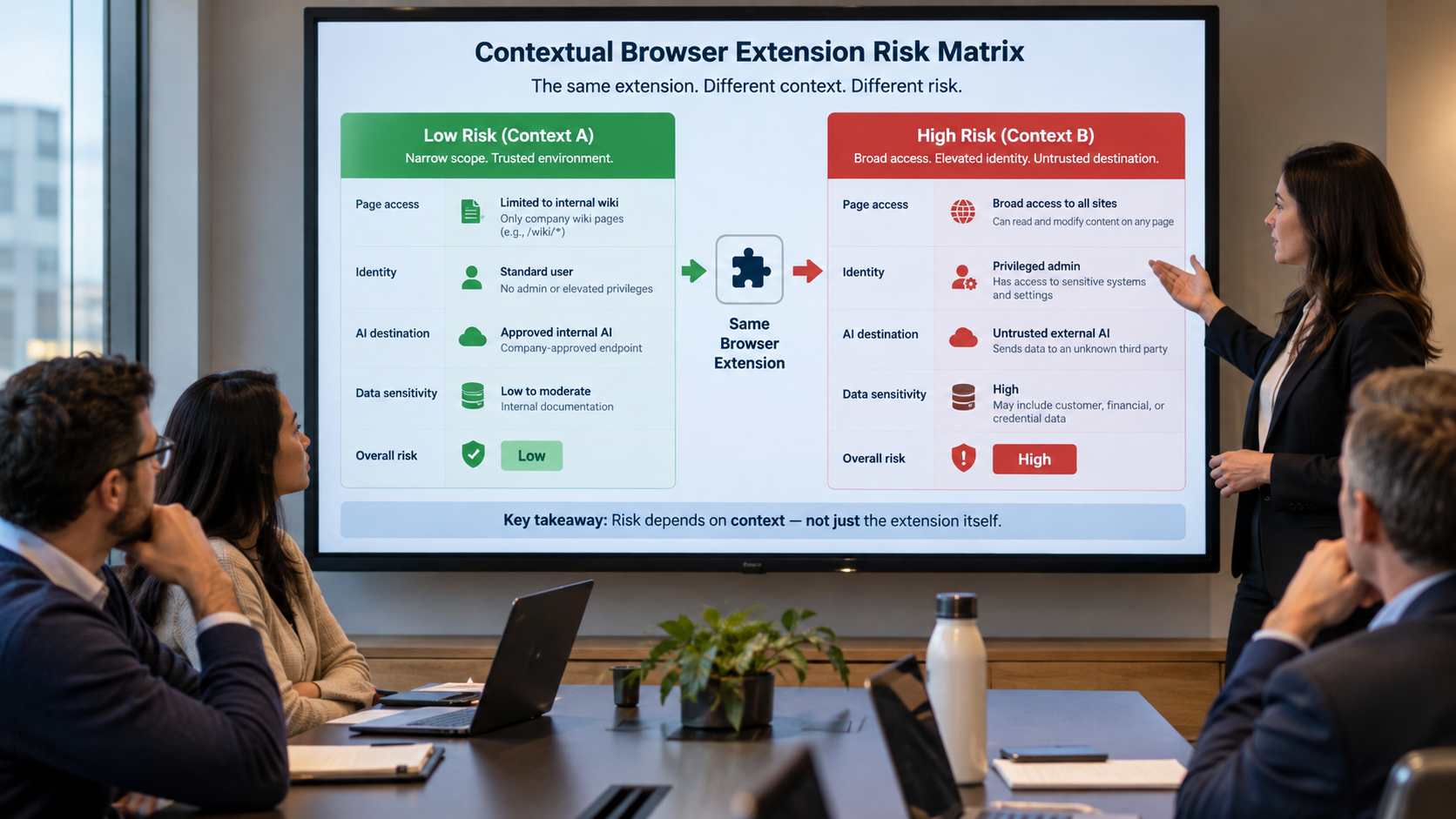
AI browser extension risk depends on the combination of permissions, user identity, sensitive-site access, AI destination, data classification, and business purpose.
A legitimate extension can still become high risk if it can read sensitive pages, operate under a privileged user session, or send data to an unapproved AI service.
Enterprises should use proportionate controls instead of blanket bans, including approved-user access, sensitive-domain restrictions, enterprise AI account requirements, quarantine, blocking, and time-bound exceptions.
Approval should not be permanent. Version changes, new permissions, new endpoints, publisher changes, and increased usage on sensitive sites should trigger re-review.
AI browser extensions are becoming one of the easiest ways for artificial intelligence to enter an enterprise. An employee can install an extension that summarizes web pages, rewrites email, researches accounts, explains code, captures meeting notes, or sends selected text to an AI model in minutes. The business benefit is obvious. The security challenge is that the extension may sit directly inside the browser session where employees already access CRM records, financial dashboards, source repositories, support systems, internal documents, and cloud administration consoles.
AIBound describes browser extensions as part of the hidden AI attack surface because they can appear without the procurement trail associated with traditional SaaS. Its Shadow AI Detection and AI Discovery capabilities frame the first requirement correctly: security teams need to know which AI extensions exist before they can decide whether the access is acceptable.
The same theme appears in AIBound’s YouTube walkthrough, which emphasizes moving from discovery to identity, connection, risk, and prevention. For browser extensions, that sequence is especially useful because the extension name alone rarely explains the real exposure. Security must understand what pages the extension can read, which browser privileges it holds, which user identity is active, what data is present, and where that data can travel.
Direct Answer: Govern the Extension as a Data and Identity Path, Not Just a Browser Add-On
Enterprises can secure AI browser extensions by treating each extension as a governed path between the employee’s browser session and an AI destination. That means continuously discovering installed extensions, inspecting requested permissions and host access, mapping the extension to the active user and business purpose, classifying the data visible in the browser, evaluating destination trust, applying a contextual risk decision, and monitoring future updates for permission or behavior changes.
A safe extension program should not begin with a blanket ban. Many extensions create real productivity value, and prohibiting every AI capability can push employees toward personal accounts or unmanaged devices. The stronger approach is to make approval specific: which extension, for which users, on which sites, with which permissions, sending which data to which destination, under which monitoring and revocation controls?
Why AI Browser Extensions Create a Distinct Security Problem
A browser extension executes close to the user’s actual work. Unlike a separate web application, it may inspect the contents of pages the employee opens, interact with tabs, store local data, inject scripts, read selected text, observe navigation, or communicate with external services. The practical risk depends on the permissions in the extension manifest, the host patterns it can reach, the code that runs in content scripts or service workers, and the external endpoints the extension contacts.
The OWASP Browser Extension Vulnerabilities Cheat Sheet highlights permission overreach, data leakage, insecure communication, malicious updates, insecure message passing, and DOM-based data skimming as risks extension developers and defenders should consider. Chrome’s extension security guidance likewise recommends minimizing permissions and limiting privileged actions. These principles become even more important when an extension is AI-enabled because the destination may be a model or agent outside the enterprise boundary.
The security question is therefore not simply, “Is this extension malicious?” A legitimate extension can still create unacceptable exposure if it has broad page access, sends content to a personal AI account, or operates under a highly privileged employee session. Conversely, an extension with a narrow purpose, restricted host permissions, an enterprise-approved AI tenant, and clear ownership may be acceptable even if it processes internal information.
1. Discover Every AI Extension Across Managed Browser Profiles
Start with inventory. Security teams should identify AI-related extensions across Chrome, Edge, Firefox, and any managed browser environment employees use. Discovery should capture the extension ID, name, publisher, version, install source, active users, browser profile, device, and whether the extension is force-installed, user-installed, or sideloaded.
The inventory should also distinguish between obvious AI assistants and extensions that quietly embed AI into another function. A grammar tool, meeting assistant, coding helper, research side panel, screenshot tool, translation utility, or sales-enrichment extension may all send page content to an AI service even when the product name does not contain “AI.”
AIBound’s article on the hidden AI attack surface is useful here because it treats browser extensions, MCP servers, and agents as operational resources that need continuous visibility, not a one-time review.
2. Inspect Host Permissions and Privileged Browser APIs
The next step is technical permission review. Host permissions determine which websites an extension may interact with. An extension limited to a small set of approved domains creates a different exposure from one requesting access to every website. Privileged APIs can expand that reach further by enabling access to tabs, clipboard content, downloads, cookies, storage, web requests, or browsing data.
- Review exact host patterns instead of relying on the user-facing install description.
- Flag <all_urls> or similarly broad access for additional scrutiny.
- Identify whether the extension can read or alter page content through content scripts.
- Review clipboard, tabs, cookies, downloads, webRequest, storage, and scripting permissions.
- Determine whether optional permissions can replace permanent permissions.
- Check whether the extension can communicate with native applications or external web pages.
- Record permission changes between versions so added scope triggers re-review.
A broad permission is not automatically proof of unsafe behavior. It is a capability. Risk emerges when the capability intersects with sensitive pages, privileged users, untrusted destinations, weak ownership, or unclear business need.
3. Map the Extension to the Identity Behind the Browser Session
A browser extension does not operate in a vacuum. It operates while a person is authenticated to enterprise systems. If a finance leader is signed into a financial platform, a developer is viewing a private repository, or an administrator is inside a cloud console, the extension may be exposed to data and actions that are far more sensitive than those available to an ordinary user.
That is why AIBound’s Identities and Connections model matters for browser risk. Security teams should connect the AI resource to the human or non-human identity it effectively operates alongside and understand which systems that identity can reach.
- Employee identity, department, and role.
- Privileged or administrative status.
- Browser profile ownership and device trust.
- Enterprise versus personal AI account.
- Active SaaS, cloud, repository, and internal application sessions.
- Whether the extension receives delegated OAuth access in addition to page access.
- Whether many people use the same extension with materially different privileges.
4. Classify the Data the Extension Can Actually See
A permissions list tells security what the extension may access. Data classification tells security why that access matters. The same extension can be low risk on public websites and high risk inside a customer database or M&A workspace.
Useful browser-context categories include public content, internal information, confidential customer data, regulated personal data, source code, credentials, security findings, employee records, financial information, legal material, and strategic documents. Security teams do not need perfect classification on day one. They need enough context to distinguish ordinary productivity use from material exposure.
One practical technique is to map sensitive web applications and URL patterns to data categories. When an AI extension runs on those domains, the security platform can raise the decision threshold or turn off the extension. This is more precise than blocking the same extension everywhere.
5. Evaluate the AI Destination and Account Type
Where the extension sends data is as important as what it can read. An enterprise-approved AI tenant with contractual protections, administrator controls, logging, retention settings, and identity enforcement has a different trust profile from a personal account, unknown endpoint, unreviewed API, or developer-controlled webhook.
Destination review should document vendor identity, domain reputation, account type, data retention, model-training terms, supported administrative controls, encryption, data residency where relevant, and whether the organization can revoke access quickly. A browser extension that sends text to several third-party services deserves more scrutiny than one connected only to a single approved enterprise tenant.
6. Combine Permissions, Identity, Data, and Destination Into One Risk Decision
The biggest improvement over simple allowlists is contextual scoring. Risk should increase as multiple concerning conditions converge. A broad host permission may be manageable for a low-privilege employee on public sites. The same permission becomes much more serious when a privileged user opens a sensitive application, and the extension communicates with an unknown AI service.
A practical risk score can consider permission breadth, sensitive-site access, identity privilege, extension provenance, publisher reputation, destination trust, external communication, update behavior, installed-user count, business criticality, and available compensating controls.
This approach aligns with the NIST AI Risk Management Framework, which encourages organizations to manage AI risk through governance, contextual mapping, measurement, and ongoing management rather than one static technical check.

7. Use Proportionate Controls Instead of a Single Allow-or-Block Rule
Once the organization has enough context, it can choose a response that preserves useful AI while reducing exposure. Tie the response to the specific risk, not fear of the category.
- Approve the extension for defined users and approved sites.
- Allow the extension but turn it off on sensitive domains.
- Restrict use to an enterprise AI account.
- Remove unnecessary permissions or require optional runtime permissions.
- Quarantine a new version until its changed permissions are reviewed.
- Block extensions from unknown publishers or untrusted distribution channels.
- Disable external destinations that are not approved.
- Remove the extension automatically through existing endpoint or browser management controls.
- Require a time-bound exception with a named business owner for special cases.
This policy model gives employees a route to approved productivity instead of forcing security to choose between uncontrolled adoption and blanket prohibition.
8. Monitor Extension Updates and Permission Drift
Approval is not permanent. Extensions change versions, publishers change ownership, optional permissions are activated, and new AI destinations can be added. A previously acceptable extension can become risky without a user reinstalling anything.
Continuous monitoring should detect version changes, new host access, newly requested privileged APIs, changes in external endpoints, shifts from enterprise to personal accounts, increased usage on sensitive sites, publisher or signature changes, and unusual growth in the user population.
A permission-drift alert should trigger targeted re-review. The security team should compare the approved baseline with the new effective permissions and ask whether the business purpose still justifies the additional reach.
9. Create an Approval Workflow With Named Ownership
Every material AI extension should have an owner. Ownership prevents discovered resources from sitting indefinitely in a “pending” state with no one accountable for the decision. The owner should be able to explain why the extension is needed, which teams use it, what data it handles, and what would break if the extension were removed.
- Discover the extension and identify active users.
- Inspect the manifest, publisher, version, permissions, and destinations.
- Map the extension to user identities, sensitive sites, and business purpose.
- Score risk using permission, data, identity, destination, and business context.
- Approve, restrict, quarantine, or block with a documented rationale.
- Monitor changes continuously and re-review material drift.

10. Give Employees Approved Alternatives
Shadow AI often signals a real business need. If employees install an AI research extension because the approved environment offers no fast way to summarize web content, security should treat that behavior as useful demand data. Blocking the extension without solving the need may simply move the activity to a personal device or unmanaged account.
Publish an approved extension catalog, explain which data categories may be used, provide enterprise AI accounts where practical, create a fast review process for low-risk requests, and show employees what to use instead when a tool is restricted. The safest workflow should also be the easiest legitimate workflow.
Metrics Security Leaders Should Track
- Total AI-related browser extensions discovered.
- Percentage with a named business owner.
- Percentage approved, restricted, pending review, quarantined, or blocked.
- Extensions with broad host permissions.
- Extensions able to run on sensitive enterprise applications.
- Users with both privileged roles and high-risk extensions.
- Extensions sending data to personal or unknown AI destinations.
- Average time from discovery to decision.
- Permission or destination changes detected after approval.
- Repeat installation attempts after a block or restriction.
A Practical 30-Day Browser Extension Security Plan
Days 1-10: Establish Visibility
Inventory AI-related extensions across managed browser profiles, group them by publisher and purpose, identify active users, and flag broad permissions. Build an initial list of sensitive enterprise domains where extension access deserves additional scrutiny.
Days 11-20: Add Context
Connect extensions to users, privilege level, account type, sensitive applications, business owner, and AI destination. Create a simple contextual risk score and define which combinations require immediate restriction or review.
Days 21-30: Enforce and Monitor
Approve low-risk extensions, restrict sensitive-domain access where possible, block untrusted extensions, establish an exception process, and configure alerts for version, permission, publisher, and destination changes.
Frequently Asked Questions
Are AI browser extensions inherently unsafe?
No. Risk depends on what the extension can access, which identity is active, what data is present, where information is sent, how the vendor handles it, and whether the organization can monitor and revoke access. Narrow permissions and an approved enterprise destination can materially reduce risk.
Should we block every extension that requests broad page access?
Broad access should trigger scrutiny, not an automatic conclusion. Some legitimate functions require broad access. The important question is whether the business purpose justifies the scope and whether sensitive pages, privileged users, and external destinations create unacceptable exposure.
Can endpoint management alone solve this problem?
Endpoint and browser management are important enforcement layers, but security still needs AI-specific context to know which extensions matter and why. Inventory, identity mapping, data context, destination trust, and continuous risk scoring turn raw extension telemetry into a defensible decision.
What should trigger re-review after approval?
New permissions, expanded host patterns, a publisher change, a new external endpoint, a major version change, use by privileged users, access to a new sensitive application, or a change in account type should all be considered material review.
Conclusion
AI browser extensions bring AI directly into the applications employees use every day. That proximity is precisely what makes them useful, and precisely what makes them a security concern. The answer is not to judge extensions by name or category. It is to understand the complete path from browser page to extension, identity, data, AI destination, and external communication.
Enterprises that continuously discover extensions, inspect permissions, map identity and data context, evaluate destination trust, enforce proportionate controls, and monitor change can support useful AI adoption without giving unreviewed browser code unnecessary access to the organization’s most sensitive work.
Find the AI already running on your devices.
Install takes 15 minutes. A full AI inventory arrives within 24 hours of deployment.