How Can Security Teams Control the Hidden AI Attack Surface?

Summary

The enterprise AI attack surface now extends far beyond browser-based chatbots. This article explains how AI agents, browser extensions, coding tools, plugins, and MCP servers expand enterprise AI risk, and how security teams can gain visibility and control before these connected systems create high-risk exposure.

Key Takeaways

The enterprise AI attack surface includes more than chatbots; it now spans agents, browser extensions, coding tools, plugins, models, and MCP servers.
Risk increases when AI resources connect to internal tools, sensitive data, APIs, repositories, and business systems.

Traditional security tools often see only part of the workflow and may miss the full AI interaction path.
Security teams need visibility into AI resources, connected identities, data paths, and actions across the environment.
AIBound helps teams discover AI resources, map identities, measure risk, and prevent high-risk AI activity before it spreads.

How Can Security Teams Control the Hidden AI Attack Surface?

The enterprise AI attack surface is expanding beyond the chatbots employees open in a browser. AI agents now connect to internal tools, browser extensions can read the pages employees visit, coding assistants operate inside development environments, and Model Context Protocol servers expose data and actions to AI clients.

Each component may appear legitimate when viewed alone. The risk emerges when the components are connected. A browser extension may pass information to an external model. An agent may use an MCP server to reach a database. A coding tool may inherit repository credentials. A plugin may add a new action that security teams never reviewed.

This creates a visibility problem for security teams. Endpoint tools see installations. Network tools see traffic. Identity platforms see accounts and roles. Cloud tools see workloads. Yet no single traditional control necessarily shows the complete AI workflow from user to model to connector to sensitive system.

AIBound’s YouTube and website materials describe a five-step response: discover AI resources, expose the identities they use, map their data connections, measure risk, and prevent high-risk activity. AIBound explains this process in its YouTube video, 5 Steps to Discover, Score, and Prevent High-Risk AI, which provides a concise visual introduction to that operating model.

To secure the hidden AI attack surface, enterprises must treat agents, extensions, plugins, models, skills, and MCP servers as first-class security assets rather than informal add-ons.

What Is the Hidden AI Attack Surface?

The AI attack surface includes every component through which an AI system receives instructions, accesses information, authenticates to services, invokes tools, stores context, and produces actions. The visible AI application is only the front end.

Common components include:

  • Public and enterprise AI applications
  • AI-powered browser extensions
  • Coding copilots and IDE extensions
  • Local and cloud-hosted models
  • Autonomous and semi-autonomous agents
  • Plugins, tools, and reusable agent skills
  • MCP clients and MCP servers
  • Model APIs and AI gateways
  • Service accounts, OAuth grants, and API keys
  • Vector databases, data pipelines, and retrieval systems
  • Workflow platforms that trigger downstream actions

A security review that inventories only approved models will miss much of this environment. The same model can be used safely in one workflow and dangerously in another, depending on the connector, identity, data, and permissions involved.

AIBound’s resource on MCP servers, AI agents, and browser extensions frames the problem as a distributed attack surface. An agent may run in the cloud, connect to an MCP server in a developer environment, use SaaS APIs, and be accessed through a browser extension. Each part may be visible in a different tool, while the complete chain remains hidden.

For a deeper technical overview, read AIBound’s guide to MCP servers, AI agents, and browser-extension risk.

Why MCP Servers Require Security Attention

Model Context Protocol makes it easier for AI clients to connect with tools and data sources. That interoperability can accelerate useful automation, but it also means that an MCP server can become a bridge between an AI system and sensitive enterprise capabilities.

The official MCP security guidance emphasizes authorization, secure implementation, and protection against attack paths such as confused-deputy problems, token misuse, and unsafe local server installation. The core lesson is that a connector should never be treated as trusted simply because it uses a standard protocol.

Security teams should understand what each MCP server exposes, which client can call it, which identity it uses, what permissions it grants, where it sends data, and whether high-impact actions require approval.

High-risk MCP patterns include:

  • Servers exposed to the public internet without a clear business need
  • Connectors that request broad OAuth scopes
  • Local servers installed through opaque commands
  • Servers that pass tokens to downstream systems unnecessarily
  • Tools that can modify or delete records without confirmation
  • Connectors without a named owner or review date
  • MCP servers that expose regulated or highly confidential data
  • Third-party servers that change functionality without enterprise review

Why Browser Extensions Are Easy to Miss

Browser extensions sit close to the employee’s daily work. Depending on their permissions, they may read webpage content, observe browsing activity, access forms, modify pages, or communicate with external services. When AI is added, the extension may summarize, classify, rewrite, or transmit information from internal applications.

The security concern is not that every AI extension is malicious. It is that employees can add extensions quickly, permissions are often broad, and the business context may be invisible to the security team. An extension used on public websites presents a different risk from the same extension operating inside an HR portal, customer database, or administrative console.

A complete review should examine the extension publisher, requested permissions, update behavior, external endpoints, data-retention practices, enterprise account controls, user population, and the internal sites on which it operates.

Why AI Agents Change the Impact of a Security Failure

Agents can make decisions about which tools to call and which steps to perform. This creates efficiency, but it also means a manipulated or poorly configured agent may take a series of actions rather than produce one unsafe output.

OWASP’s guidance on Excessive Agency highlights three root causes: excessive functionality, excessive permissions, and excessive autonomy. An agent becomes especially dangerous when all three are present. It can reach many systems, perform high-impact operations, and act without meaningful human confirmation.

The attack surface therefore includes not only software vulnerabilities but also natural-language instructions, tool descriptions, stored memory, retrieved documents, peer agents, and external content that may influence the agent’s behavior.
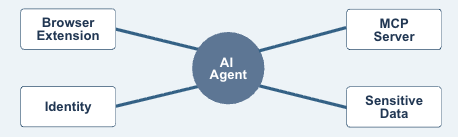
The hidden AI attack surface appears where agents, extensions, connectors, identities, and sensitive data intersect.

The Six Questions That Reveal Hidden AI Risk

1. What AI Resources Exist?

Inventory applications, extensions, models, APIs, agents, plugins, skills, MCP servers, and embedded AI features. Discovery should span browsers, endpoints, networks, cloud environments, code repositories, and SaaS applications.

2. Who or What Operates Them?

Map every resource to employees, departments, service accounts, API keys, OAuth applications, cloud roles, and machine identities. Ownership should be explicit.

3. What Can They Reach?

Identify datasets, applications, repositories, files, infrastructure, and external services. Include indirect access through connectors and inherited user permissions.

4. What Can They Do?

Distinguish between read, write, modify, delete, publish, deploy, transfer, and financial actions. A tool that can only retrieve public information is not equivalent to one that can change production systems.

5. How Autonomous Are They?

Determine whether a person approves each action, approves only the goal, or is not involved. Review whether the downstream application independently enforces authorization and transaction limits.

6. What Is the Potential Blast Radius?

Estimate the number of users, systems, records, customers, or workflows that could be affected. This context helps security teams prioritize risk rather than treating every discovered tool as equally urgent.

A Five-Step Program for AI Attack Surface Security

Step 1: Establish Continuous Discovery

Connect telemetry from browser, endpoint, network, identity, code, and cloud systems. Continuous discovery matters because AI resources appear and change faster than annual assessments can capture.

Step 2: Build a Relationship Map

Create a graph of AI resources, identities, connectors, datasets, and actions. The goal is to see the entire workflow, not isolated assets. This is where dangerous combinations become visible.

Step 3: Classify and Score Risk

Consider resource security, data sensitivity, identity privilege, permissions, autonomy, exposure, ownership, and blast radius. AIBound describes A–F risk grades designed to turn large inventories into prioritized decisions.

Step 4: Apply Proportionate Controls

Allow low-risk tools, monitor uncertain uses, restrict sensitive data, require enterprise accounts, reduce permissions, disable unsafe connectors, require human approval, or block resources whose risk cannot be reduced.

Step 5: Monitor for Change

Track new extensions, server updates, expanded scopes, new tools, changed model providers, unusual traffic, dormant credentials, and new data connections. Approval should be treated as a monitored state, not a permanent conclusion.

The NIST AI Risk Management Framework offers a useful governance structure for turning this discovery data into repeatable risk decisions.

Additional AIBound resources cover Shadow AI discovery, governance, risk scoring, and real-time prevention.

How to Secure Each Layer Without Replacing the Security Stack

Browser and Endpoint

Use existing browser management and endpoint controls to identify applications, extensions, local models, and agents. Correlate installation data with the user, department, internal sites accessed, and resource risk.

Network

Monitor DNS, proxy, gateway, and API traffic for AI services, model endpoints, connector communication, and unexpected data movement. Network visibility can reveal services that leave no installed application on a managed device.

Identity

Map AI resources to human and machine identities. Review OAuth grants, cloud roles, service accounts, shared accounts, API keys, and token lifetimes. Reduce access according to task and business impact.

Code and Development

Identify coding assistants, IDE extensions, model SDKs, agent frameworks, and MCP configurations. Protect secrets, separate test and production access, and require review before agents can modify or deploy code.

Cloud and SaaS

Inventory hosted models, AI services, data pipelines, embedded copilots, and autonomous workflows. Watch for vendors activating new AI features inside applications that were approved before those features existed.

Workflow and Governance

Push findings into existing ticketing, SIEM, orchestration, and governance platforms. The security team should not need to manage a separate manual process for every AI resource. Evidence of ownership, review, policy, and remediation should be retained for leadership and audit needs.

A 60-Day Action Plan

Days 1–15: Discover and Prioritize

Connect available telemetry, create the first inventory, and identify resources that combine privileged identities, sensitive information, external exposure, or autonomous action. Do not wait for perfect coverage before investigating obvious high-risk combinations.

Days 16–30: Assign Ownership and Map Connections

Name business and technical owners. Document MCP servers, plugins, tools, identities, datasets, permissions, and external model providers. Remove abandoned resources and unnecessary credentials.

Days 31–45: Implement Guardrails

Reduce permissions, restrict browser extensions, require enterprise accounts, apply data controls, isolate test environments, add approval checkpoints, and block clearly unacceptable resources.

Days 46–60: Operationalize Monitoring

Create alert thresholds, ticket workflows, exception processes, executive reporting, and recurring reviews. Publish approved alternatives so employees can continue using AI productively without creating new blind spots.

Metrics Security Leaders Should Track

Useful metrics include total AI resources discovered, resources without owners, AI extensions with broad permissions, publicly exposed MCP servers, agents with privileged access, tools connected to sensitive data, resources without human approval controls, average remediation time, repeated policy violations, newly discovered connections, and changes in risk grades over time.

These measures help leadership understand whether the attack surface is becoming more visible and controlled, even as the organization adopts more AI.

Frequently Asked Questions

Is every MCP server high risk?

No. Risk depends on exposure, identity, permissions, data sensitivity, actions, ownership, and monitoring. A narrowly scoped internal server with strong authorization presents a different risk from a public server connected to confidential systems.

Are enterprise-approved AI applications automatically safe?

Approval reduces uncertainty, but risk can change when a vendor adds new models, plugins, permissions, data uses, or autonomous features. Sanctioned AI should remain continuously monitored.

Can an organization secure AI using only network controls?

Network controls are valuable, but they may not explain which identity is involved, what a browser extension can read, which permissions an agent inherited, or what an MCP server exposes. Multiple telemetry layers need to be correlated.

What should be blocked immediately?

Prioritize resources with clearly unacceptable combinations, such as unowned public connectors to sensitive systems, agents using administrative credentials without approval, extensions transmitting confidential data, or tools designed to bypass policy. Other resources may be restricted or reviewed rather than blocked automatically.

Conclusion

The hidden AI attack surface is not one new category of software. It is a connected ecosystem of applications, agents, identities, extensions, models, tools, skills, MCP servers, and enterprise data.

Security teams need to see how those components work together. Discovery creates the inventory. Identity and connection mapping reveal authority and exposure. Contextual scoring identifies the risks that matter most. Proportionate controls allow safe use to continue while dangerous combinations are stopped.

As AI becomes more autonomous, the central security question will not be only “Which model is in use?” It will be “Which system is acting, under whose authority, with access to what, and how quickly can we intervene?”

To see which agents, extensions, models, and MCP servers are operating in your environment, request an AIBound Shadow AI Risk Report.

See Your AI Attack Surface

Discover every AI tool, agent, and model running in your enterprise — before attackers do.
Request a Demo

Related Articles

How Can Enterprises Secure AI Identities Before Agents Gain Too Much Access?
Articles
1
min read

How Can Enterprises Secure AI Identities Before Agents Gain Too Much Access?

July 26, 2026
Read more

Artificial intelligence is no longer operating only as a tool that waits for a person to type a prompt. Across modern enterprises, AI assistants and agents are beginning to authenticate to applications, access internal information, call APIs, use plugins, and complete tasks on behalf of employees and business systems.

That shift makes identity one of the most important control points in enterprise AI security. An AI system may appear harmless when viewed only as an application name. Its real risk becomes visible when security teams identify the user, service account, role, token, or machine identity under which it operates and then examine what that identity is permitted to do.

A writing assistant with access only to public content presents a very different exposure from an autonomous agent using a privileged account across production repositories. The model may be similar, but the authority behind it is not.

AIBound’s YouTube video 5 Steps to Discover, Score, and Prevent High-Risk AI places “Expose AI Identities” immediately after discovery. That order matters. Finding an AI resource tells security teams that it exists. Mapping its identity begins to reveal what it can actually reach and change.

Enterprises that want to adopt AI safely therefore need a structured program for discovering AI identities, reducing unnecessary permissions, monitoring access changes, and preserving human approval for high-impact actions.

What Is an AI Identity?

An AI identity is any human or non-human identity through which an AI application, model, assistant, agent, extension, or automated workflow accesses enterprise resources. Sometimes the AI acts directly through a dedicated service account. In other cases, it inherits the permissions of an employee, an OAuth application, a cloud role, an API key, or a shared integration account.

The identity may be obvious in a cloud console, or it may be hidden several layers deep. An employee signs into a SaaS platform. The platform activates an AI assistant. The assistant calls a plugin. The plugin uses a service account to query a database. The visible user is only one part of the chain.

Security teams should therefore document both the top-level identity and the downstream identities involved in the workflow. A useful inventory distinguishes between:

  • Individual employee accounts used by AI-enabled applications
  • Shared accounts used by teams or departments
  • Service accounts created for agents and automations
  • OAuth applications and delegated authorization grants
  • Cloud roles and workload identities
  • API keys, access tokens, and integration secrets
  • Local machine identities used by developer tools
  • Agent-to-agent identities in multi-agent workflows

This inventory is the foundation for answering a more meaningful question than “Who launched the tool?” The more important question is “Whose authority is the tool using at every step?”

Security teams can explore additional AIBound AI security resources covering Shadow AI, governance, agents, and emerging attack-surface risks.

Why AI Identity Risk Is Different From Ordinary Access Risk

Traditional identity and access management assumes that a person or workload requests access to a defined resource for a relatively predictable purpose. AI agents introduce more uncertainty because they may interpret natural-language instructions, select tools dynamically, chain multiple actions, and act on outputs generated during the workflow.

An identity that was acceptable for a fixed automation may become too powerful when attached to an adaptive agent. The agent may be able to choose among many functions, repeat actions, combine information from different systems, or respond to content that contains malicious instructions.

OWASP describes “Excessive Agency” as the risk created when an LLM-based system has excessive functionality, permissions, or autonomy. In practical terms, an agent does not need to exploit a software vulnerability if the organization has already given it more authority than the task requires.

This is why the permission review cannot stop at the model or application. Security teams must examine the complete chain:

  • What functions can the agent invoke?
  • Which identity authorizes each function?
  • Can the agent read, create, modify, delete, publish, or transfer data?
  • Can it access credentials or generate new tokens?
  • Can it trigger financial, operational, or customer-facing actions?
  • Does a person review the action before execution?
  • Can downstream systems independently verify authorization?

A companion AIBound video walkthrough is available at AIBound enterprise AI security walkthrough. It can be linked beside this article to help readers explore the wider enterprise AI security context.

The Four Identity Patterns That Create the Most Risk

1. Agents That Inherit Broad Employee Permissions

An assistant operating through an employee session may gain access to everything that person can reach in email, cloud storage, collaboration platforms, customer systems, and internal dashboards. The employee may understand the sensitivity of those systems, but the agent may process instructions or external content without the same judgment.

2. Shared Service Accounts With No Clear Owner

Shared accounts are difficult to govern because activity cannot be attributed cleanly to one person or one use case. When several automations and agents use the same credentials, security teams may not know which workflow performed an action or whether removing access will break another process.

3. Long-Lived Tokens and API Keys

Long-lived credentials can remain valid after a pilot ends, a developer changes roles, or an integration is no longer needed. If an agent stores those credentials locally or passes them through plugins, the potential exposure grows.

4. Privileged Machine Identities

Agents connected to administrative roles, production repositories, deployment systems, HR databases, or financial platforms can create a large blast radius. A single incorrect or manipulated action may affect many records, users, or systems before a person notices.

AI identity risk is created by the complete permission path, not by the model name alone.

A Seven-Step Framework for Securing AI Identities

Step 1: Discover the AI Resource and Its Identity

Begin by identifying AI applications, agents, extensions, models, MCP servers, and embedded AI features across browsers, endpoints, networks, code environments, and cloud services. For every resource, record the human and machine identities involved.

Step 2: Map the Complete Permission Path

Document the systems, datasets, tools, and actions accessible through each identity. Include inherited permissions, delegated OAuth scopes, plugin permissions, cloud roles, and any credentials stored by the agent or workflow.

Step 3: Assign an Owner and Business Purpose

Every material AI identity should have a named owner who can explain why it exists, what task it supports, what data it handles, and how long the access is needed. Unowned identities should be treated as higher risk until ownership is established.

Step 4: Apply Least Privilege

Reduce permissions to the minimum required for the specific task. Prefer read-only access where possible, restrict access to selected repositories or datasets, separate testing from production, and avoid broad administrative roles.

Step 5: Limit Credential Lifetime

Use short-lived tokens, managed workload identities, and automated credential rotation. Remove access when a pilot ends or an agent is retired. Avoid embedding reusable secrets in prompts, local files, extensions, or agent memory.

The NIST AI Risk Management Framework also provides a practical structure for governing, mapping, measuring, and managing AI risk as identities and permissions change.

Step 6: Require Human Approval for High-Impact Actions

Human review is especially important when an AI system can send payments, deploy code, delete records, change permissions, communicate externally, or act on regulated information. The reviewer should see the proposed action, the target system, the data involved, and the identity that will execute it.

Step 7: Monitor Identity and Permission Changes Continuously

AI workflows evolve quickly. New plugins are installed, scopes expand, service accounts are reused, models change, and agents gain new functions. A quarterly access review is unlikely to capture the pace of change. Security teams need continuous monitoring for new identities, new grants, dormant credentials, unusual access, and changes in the blast radius.

How AIBound Connects Identity to Risk

AIBound positions AI identity as part of a five-stage control process: discover Shadow AI, expose the identities it uses, map the data connections available to those identities, measure the resulting risk, and prevent high-risk activity. The platform states that it combines telemetry from browser, endpoint, network, cloud, and existing security tools rather than relying on a separate view of each layer.

The value of this approach is correlation. A browser event may show that an employee opened an AI tool. Identity telemetry may show the user’s role. Cloud and data-security information may show that the role can access sensitive records. When these signals are connected, security teams can distinguish routine use from a dangerous combination.

AIBound's AI governance framework for CISOs explains how identity controls fit into a broader enterprise governance program.

A Practical AI Identity Policy

A useful policy should be specific enough to guide technical decisions without preventing legitimate experimentation. It can establish the following rules:

  • Every production AI agent must use a dedicated, identifiable account.
  • Shared credentials are prohibited for high-impact AI workflows.
  • AI identities must have a documented owner and expiration or review date.
  • Administrative access requires written justification and additional monitoring.
  • Agents should receive read-only access unless write access is essential.
  • High-impact actions require human confirmation or an independently enforced approval step.
  • Credentials must be stored in approved secret-management systems.
  • Unused tokens, OAuth grants, and service accounts must be revoked promptly.
  • New plugins, skills, tools, and MCP connections require permission review.
  • Identity and access events must be retained for investigation and audit.

The policy should also define a fast path for low-risk use cases. An employee using an approved assistant with public information should not face the same review process as a developer connecting an autonomous agent to production infrastructure.

Metrics That Show Whether Identity Controls Are Working

Security leaders can track the number of AI identities discovered, the percentage with named owners, privileged AI identities, shared accounts used by agents, long-lived credentials, identities with access to sensitive data, agents operating without human approval, average time to revoke unused access, permission reductions completed, and high-risk identity combinations prevented.

These measurements help leadership understand whether the organization is reducing exposure while AI adoption grows. The goal is not to produce fewer AI identities. It is to make every identity visible, owned, appropriately scoped, and continuously monitored.

Frequently Asked Questions

Should every AI agent have a separate identity?

Production agents and high-impact automations should generally use dedicated identities so permissions, ownership, and activity can be traced. Low-risk features embedded inside an approved application may continue to operate through user sessions, provided the inherited access is understood and controlled.

Is multifactor authentication enough to protect AI identities?

Multifactor authentication protects the login process, but it does not reduce excessive permissions, limit autonomy, or prevent an authenticated agent from taking an unsafe action. It should be combined with least privilege, short-lived credentials, approval controls, and monitoring.

What identity should be investigated first?

Prioritize identities that combine administrative privileges, sensitive data access, broad system reach, long-lived credentials, weak ownership, and autonomous action. These characteristics create the largest potential blast radius.

Can existing IAM tools manage AI identity risk?

Identity platforms provide essential data and enforcement, but they may not know which accounts belong to AI resources or how an agent, model, plugin, and data connection combine into one risk. An AI-specific control layer can add that context while using existing IAM tools for enforcement.

Conclusion

The enterprise AI security problem is not only about which models employees use. It is also about the authority those models and agents receive. Identity determines what AI can access, which actions it can take, and how far an error or attack can spread.

By discovering AI identities, mapping permission paths, applying least privilege, limiting credential lifetimes, preserving human approval, and monitoring changes continuously, organizations can support ambitious AI adoption without giving autonomous systems unchecked authority.

The safest AI identity is not necessarily the one with the fewest permissions. It is the one whose purpose, owner, access, behavior, and risk are clearly understood.

To identify unmanaged agents, exposed identities, and risky permission paths, request an AIBound Shadow AI Risk Report.

Why Do Enterprises Need an AI Control Plane Now?
Articles
1
min read

Why Do Enterprises Need an AI Control Plane Now?

July 24, 2026
Read more

Most enterprise security teams already own tools for endpoints, browsers, networks, identities, cloud environments, data protection, incident response, and compliance.

Yet many still cannot answer a fundamental question: Which artificial intelligence systems are operating inside the organization, and what are they capable of doing?

The difficulty is not necessarily a lack of telemetry. The information may already exist in endpoint events, DNS records, browser activity, cloud logs, identity platforms, and security alerts.

The problem is fragmentation. One tool may identify an AI application. Another may contain information about the employee, using it. A third may display the service account associated with it. A fourth may know that the associated repository contains sensitive code. Unless those signals are connected, the security team sees isolated events rather than the complete risk.

An AI control plane provides the missing coordination layer. Its purpose is not to replace every existing security tool. It is to connect their signals so the organization can understand and control AI-specific risk.

What Is an AI Control Plane?

An AI control plane is the centralized layer through which an organization can discover AI resources, maintain an enterprise AI inventory, connect AI activity to users and machine identities, map data access and system relationships, evaluate application, model, and agent risk, prioritize remediation, apply AI usage policies, produce governance evidence, monitor changes continuously, and prevent high-risk activity.

The concept is similar to other control-plane architectures in technology. Individual systems continue performing their operational roles, while a central layer provides coordinated policy, visibility, and management.

For enterprise AI, the control plane should span more than applications officially deployed by the organization. It must account for public AI services, embedded SaaS features, local models, coding assistants, agents, extensions, plugins, skills, APIs, and MCP servers.

A useful operational model moves through five connected stages: discover AI, identify its users and identities, map its data and system connections, measure the resulting risk, and prevent dangerous activity. These stages clearly distinguish an AI inventory product from an operational AI security platform.

Why AI Discovery Alone Is Not Enough

Discovery answers, “What is present?” Security also needs to answer who or what is operating it, which credentials it uses, what information it can access, which actions it can perform, what happens if it is manipulated, how large the potential impact is, whether the use complies with policy, and whether the organization can stop it.

An inventory containing hundreds of AI tools does not automatically explain which few require immediate action.

Consider three applications. The first is an unapproved writing assistant used with public marketing content. The second is an approved coding assistant connected to a single test repository. The third is an autonomous development agent using an administrative service account across production repositories.

A discovery-only product may identify all three. A risk-aware AIcontrol plane should reveal that the third has the most dangerous combination of autonomy, permissions, sensitive assets, and potential blast radius.

The New Security Challenge: AI Can Act

The most important change introduced by agentic AI is that the technology may do more than generate text or images.

AI agents can call tools, query databases, modify files, create tickets, send messages, execute code, manage workflows, and interact with other agents. Their effective authority depends on their identities, permissions, plugins, and systems.

This creates a fundamental security question: What is the agent allowed to do, and under whose authority?

Excessive agency can result from excessive functionality, permissions, or autonomy. An AI system may cause harm when it responds incorrectly, follows manipulated instructions, or takes action without sufficient human oversight.

The most effective protections include limiting functionality and permissions, preserving user-context authorization, enforcing least privilege, and requiring human approval for high-impact actions.

A model assessment cannot answer every operational question. The enterprise needs to evaluate the complete chain of identity, access, behavior, and impact.

From AI Resource to Business Impact

An effective AI control plane connects five layers of context.

The first layer is the resource. Security must identify whether the technology is a public application, enterprise copilot, model API, local model, browser extension, coding assistant, autonomous agent, plugin, skill, or MCP server.

The second layer is identity. The organization must determine which employee, service account, API key, cloud role, OAuth application, or machine identity is used to operate the resource. This reveals the authority under which the AI acts.

The third layer is access. Teams need to know which systems, repositories, datasets, applications, tools, and functions the AI can reach. Access may be direct, inherited through a user, or exposed through a connector.

The fourth layer is behavior. Security must understand what the AI is actually doing. Relevant behavior may include reading documents, indexing files, generating code, modifying records, transferring information, invoking external services, or triggering another agent.

The fifth layer is impact. Teams must estimate what could happen if the AI is misused, compromised, manipulated, or incorrectly configured. Potential consequences include information disclosure, unauthorized changes, regulatory exposure, operational disruption, financial loss, and loss of intellectual property.

Without this chain of context, security teams receive alerts without understanding their importance.

Why Existing Security Tools Create an Incomplete Picture

Existing controls remain essential. The challenge is that each sees only part of the AI environment.

Endpoint platforms may detect installed applications, browser extensions, and local processes. They may not understand whether the application is an AI resource, how risky it is, or which cloud systems it can reach.

Network security logs may identify connections to AI domains or APIs. They may not reveal the business purpose, user identity, prompt content, or the application's permissions.

Browser security can identify web applications and extensions, but may have limited visibility into agents operating through cloud workloads or development environments.

Identity systems show users, roles, applications, and authentication events. They may not classify an identity as belonging to an AI agent or understand the model and tools behind it.

Cloud security platforms can reveal AI services, models, workloads, and permissions within a particular environment. They may miss employee use of external applications or AI embedded inside SaaS products.

Data-security products may identify sensitive information movement but may not connect that movement to a specific AI model, agent, plugin, or business use case.

An AI control plane correlates these perspectives. It turns existing telemetry into an AI-specific inventory, relationship map, risk model, and enforcement process.

The Five Operational Functions of an AI Control Plane

1. Continuous Discovery

The control plane should identify new applications, agents, extensions, models, AI services, plugins, skills, and MCP servers as they appear.

Discovery should cover sanctioned and unsanctioned resources. It should also recognize AI functionality that vendors add to applications the organization already uses.

The result should be a continuously updated inventory rather than an annual spreadsheet. Security teams should be able to see which resources are active, where they were detected, which departments use them, whether they have an owner, and whether their use has increased or changed.

2. Identity and Relationship Mapping

Every material AI resource should be connected to human users, machine identities, business departments, data repositories, cloud services, applications, plugins, skills, APIs, MCP servers, and business owners.

Relationship mapping is what reveals dangerous combinations. An agent may appear harmless until security discovers that it operates through a service account with broad repository access. A meeting assistant may appear low risk until it is found retaining confidential transcripts. A browser extension may become critical when it can read internal administrative pages.

The application name alone rarely tells the complete story. Its relationships determine the real exposure.

3. Contextual Risk Scoring

Risk scoring should consider more than vendor reputation. A mature model evaluates security posture, data sensitivity, permissions, identity privileges, autonomy, deployment location, business criticality, regulatory relevance, number of affected users, potential blast radius, known vulnerabilities, policy status, and compensating controls.

Explainable scoring is essential. Security teams, application owners, executives, and auditors should be able to understand why a resource received its rating and which change would reduce the risk.

A coding assistant with read-only access to a test repository may be low risk. The same assistant, connected to production repositories via an administrator account, may be critical.

4. Policy Enforcement

The control plane must turn insight into action. Depending on the context, security teams may approve an application, monitor its use, require enterprise authentication, prevent uploads of sensitive data, restrict access to certain departments, remove unnecessary permissions, disable a plugin, revoke a token, require human approval, block an application, generate a remediation ticket, or escalate an incident.

Enforcement should integrate with the tools the enterprise already uses. Existing browser, endpoint, identity, network, cloud, and workflow controls can often execute the action once the AI control plane has provided the context and decision.

5. Governance and Evidence

Enterprise AI governance requires defensible records. Security and compliance teams may need to demonstrate which AI systems are in use, who owns them, how risks were assessed, which data they process, which controls are applied, when approvals occurred, how incidents were handled, whether high-risk systems are monitored, and how risk has changed over time.

Why MCP Servers, Plugins, and Skills Need Special Attention

The AI ecosystem increasingly relies on connectors that enable models to interact with external tools and data. MCP servers, plugins, and skills can make AI significantly more useful. They can also expand what an assistant can reach and what actions it can perform.

The security issue is not limited to whether the primary AI vendor is trusted. A trusted assistant may load an untrusted connector. That connector may request excessive permissions, contain malicious instructions, expose credentials, or send information to an external system.

Harmful instructions may be expressed in ordinary language rather than conventional code. That can make them difficult for tools designed primarily to identify code-based vulnerabilities.

A control plane should therefore inventory the components inside the AI system, not only the top-level application.

Security teams should ask which connectors are installed, who installed them, what permissions they request, what external services they contact, whether they can access credentials, whether they can modify or export information, whether their instructions are reviewed, whether one compromised component can affect other agents, whether a defined owner exists, and whether access can be revoked centrally.

What High-Risk AI Looks Like in Practice

High-risk AI is defined by context rather than a single product category. Examples include a coding agent with administrative access to production repositories; an HR assistant connected to employee records through an unreviewed MCP server; a public AI application processing customer financial information; a model using credentials shared across departments; an agent able to send payments without human approval; or a plugin that can read and export cloud-storage files.

The underlying risk pattern is consistent. AI becomes more dangerous when it combines broad access, sensitive information, weak ownership, and the ability to act.

How an AI Control Plane Supports Enterprise Leaders

For CISOs

For a CISO, the control plane provides prioritization and defensibility. Instead of reporting only how many AI applications were found, the security team can explain which resources create the greatest exposure, which identities have excessive privileges, which data connections require attention, which high-risk tools were restricted, which risks remain accepted, and whether the organization’s posture is improving.

For CIOs and IT Leaders

CIOs need visibility into adoption, duplication, cost, and business value. A control plane can help identify which departments use AI most heavily, which tools perform similar functions, which applications lack ownership, where enterprise licenses may replace personal accounts, which tools employees repeatedly request, and where Shadow AI reveals an unmet business requirement.

For Privacy, Risk, and Compliance Teams

Privacy and compliance teams need evidence about data processing, ownership, risk classification, and control effectiveness. An AI control plane can provide records showing which applications process personal information, where AI activity occurs, which departments are responsible, what permissions exist, whether assessments were completed, which policies were enforced, and how exceptions were approved.

How to Evaluate an Enterprise AI Control Plane

Begin with discovery coverage. Can the platform identify AI across browsers, endpoints, networks, cloud services, code environments, SaaS applications, and local deployments? Does it recognize applications, models, agents, extensions, plugins, skills, and MCP servers?

Then examine identity context, data, and permission mapping, explainable risk scoring, enforcement capabilities, integrations, deployment effort, governance evidence, and continuous monitoring. These questions help distinguish a complete control plane from a narrow discovery dashboard.

A Practical Implementation Roadmap

The first phase is connecting existing telemetry. Begin with endpoint, browser, network, identity, and cloud sources already available. The immediate objective is to conduct an initial inventory and identify the most obvious high-risk combinations.

The second phase is establishing ownership. Assign owners to important AI resources. Determine why each resource exists, what information it processes, and whether its current access is necessary. Resources without ownership should be subject to additional scrutiny.

The third phase is defining risk thresholds. Create criteria for low, moderate, high, and unacceptable risk. Document which combinations require immediate restriction, such as privileged identities, regulated data, autonomous action, or unreviewed external connectors.

The fourth phase is integrating response workflows. Push findings into the systems security teams already use. Create tickets, notify owners, track exceptions, preserve evidence, and automate repeatable actions where appropriate.

The fifth phase is enabling approved adoption. Publish approved tools, review standards, and request procedures. Use discovery data to understand what employees need and where existing options are inadequate.

The sixth phase is reporting and improving. Track adoption, high-risk activity, remediation times, policy exceptions, and changes in exposure. Use the data to refine policies and identify where the business needs better enablement.

Frequently Asked Questions

Is an AI control plane the same as an AI gateway?

Not necessarily. An AI gateway commonly manages traffic between applications and model providers. It may handle authentication, routing, logging, cost controls, and prompt security. An AI control plane has a broader enterprise role. It identifies AI resources across multiple environments, maps identities and data connections, assesses risk, coordinates governance, and supports enforcement through existing security infrastructure.

Does an AI control plane replace endpoint or network security?

No. It should use and enrich the signals produced by those systems. Endpoint, browser, network, identity, cloud, and data platforms remain important sources for enforcement and telemetry.

Can an AI control plane help with sanctioned AI?

Yes. Approved applications can still become risky when permissions, integrations, data access, or behavior change. The control plane should monitor both sanctioned and unsanctioned resources.

Why is identity important in AI security?

Identity determines authority. It reveals which information and functions the AI can access and whether it acts as an individual, shared account, service account, application, or privileged machine identity.

Should every autonomous agent be classified as high risk?

Not automatically. Risk depends on access, permissions, autonomy, data sensitivity, business impact, and compensating controls. An agent operating in an isolated test environment presents a different risk from one with production administrative access.

How quickly should an organization deploy an AI control plane?

Organizations should begin by connecting the telemetry they already possess and identifying their highest-risk activity. Perfect governance is not required before improving visibility. Early discovery can help define priorities for the broader program.

Conclusion

AI security cannot stop at finding tools.

Enterprises need to understand the identities behind those tools, the systems and data they can reach, the permissions they possess, and the actions they may take. They then need a consistent way to measure risk, enforce decisions, and provide evidence to leadership and regulators.

An AI control plane brings these functions together. It converts fragmented security telemetry into a living inventory. It connects resources to identities and sensitive systems. It distinguishes ordinary AI use from dangerous combinations. It helps security teams act before an exposure becomes an incident.

AIBound was built around this model: discover AI, expose its identities, map its connections, measure the risk, and prevent high-risk activity.

As AI becomes more autonomous and deeply integrated with enterprise systems, this coordinated control layer will become increasingly important. The organizations that establish it early will be better positioned to accelerate AI adoption without losing visibility, accountability, or control.

How Can Enterprises Control Shadow AI Without Slowing Innovation?
Articles
1
min read

How Can Enterprises Control Shadow AI Without Slowing Innovation?

July 21, 2026
Read more

Artificial intelligence is spreading through enterprises faster than most IT and security teams can document it.

Employees are experimenting with AI writing assistants, coding copilots, meeting tools, browser extensions, research platforms, design applications, and automated agents. Developers are connecting models to repositories, cloud services, and internal APIs. Business teams are enabling AI features inside software that the organization approved years ago.

Much of this activity begins with a legitimate goal: completing work faster.

The security problem begins when organizations cannot answer basic questions about that activity. Which AI applications are employees using? Who is using them? What information can those tools access? Which identities or service accounts are involved? Where is enterprise data being sent? Which uses are approved, and which create unacceptable risk?

This is the challenge of Shadow AI.

Controlling Shadow AI does not mean prohibiting every unfamiliar tool. It means creating sufficient visibility, context, and enforcement to enable safe AI adoption while stopping activity that could expose sensitive information or create compliance risk.

What Is Shadow AI?

Shadow AI is the use of AI applications, models, agents, extensions, or services without the organization’s IT and security functions' complete approval, visibility, or governance.

The category is much broader than employees opening a public chatbot. It can include a browser extension that summarizes confidential webpages, a coding assistant connected to private repositories, an AI meeting tool that retains transcripts, an autonomous agent using a privileged service account, a SaaS application that activates a new AI feature by default, a developer running an open-source model locally, an unreviewed Model Context Protocol server, or an AI assistant with plugins that can access email, files, and cloud applications.

Organizations therefore need to discover AI applications, agents, models, extensions, and connectors across the enterprise, create a usable inventory, and understand the information and systems connected to each resource. This makes Shadow AI an environment-wide visibility challenge, not simply a browser-control problem.

Why Traditional Shadow IT Controls Are Not Enough

Traditional Shadow IT programs usually concentrate on unsanctioned software, unmanaged devices, or unapproved cloud services. Those controls remain useful, but AI introduces additional layers of risk.

A conventional application generally performs functions defined by its code and configuration. An AI agent can interpret instructions, select tools, call external systems, and take actions based on generated output. Its behavior may depend on its prompt, model, plugins, permissions, memory, connected data, and the identity under which it operates.

Consequently, knowing that an AI tool exists does not tell a security team whether it is safe. Two employees could use the same application with entirely different risk levels. One may use it to improve public marketing copy. Another may connect it to a repository containing proprietary code. The application name is the same, but the data sensitivity, permissions, identity, and potential impact are completely different.

The Direct Answer: Control the Risk, Not AI Adoption

Enterprises can control Shadow AI without slowing innovation by building a continuous process that discovers AI activity, creates a living inventory, connects every resource to users and identities, maps accessible data and systems, scores risk using technical and business context, applies proportionate policies, gives employees approved alternatives, and monitors changes continuously.

This approach separates productive experimentation from genuinely dangerous activity. A low-risk application used with public information may be approved quickly. A tool processing regulated records may require additional controls. An autonomous agent with administrative access may need immediate restriction, regardless of whether the underlying model comes from a trusted vendor.

The goal is not one universal AI policy. The goal is a defensible process for making different decisions about different risks.

Step 1: Discover AI Across Every Relevant Layer

The first requirement is comprehensive discovery. AI activity can appear across browsers, endpoints, network traffic, cloud environments, development tools, and existing SaaS applications. Looking at only one layer creates predictable blind spots.

Endpoint management may reveal an installed coding assistant but miss a web-based chatbot. Network logs may identify traffic to an AI service but fail to explain which browser extension initiated it. Cloud monitoring may identify deployed models but overlook employees using consumer AI accounts.

A complete discovery program should combine signals from browser, endpoint, network, identity, and cloud environments to identify AI applications, extensions, agents, models, MCP servers, plugins, and other connected resources.

Discovery should run continuously. A spreadsheet created during an annual assessment will become outdated as employees install new extensions, vendors release AI features, and developers introduce new agents.

Step 2: Build a Living AI Inventory

Discovery results must be converted into an inventory that security, IT, privacy, and compliance teams can use.

An AI inventory should contain more than the vendor name. Useful records include the application, model, or agent name; resource category; vendor and hosting model; browser, endpoint, network, or cloud location; users and business departments; business owner; approval status; connected identities; accessible systems and datasets; permissions; data-retention practices; model-training practices; risk rating; required remediation; review history; and current enforcement status.

The difference between a list and an operational inventory is ownership. Every material AI resource should have someone responsible for explaining why it is needed, what information it processes, and what controls are in place.

Step 3: Map Users, Service Accounts, and AI Identities

The next step is understanding identity. Security teams should determine whether the AI resource acts as an individual employee, a shared account, a service account, a cloud role, an API key, an OAuth application, a machine identity, an autonomous agent, or a plugin operating through another assistant.

The identity determines what the AI can reach. An AI summarization tool running in a user’s browser may have access to pages the user can view. A coding agent using a service account could reach multiple repositories. An assistant connected to email, cloud storage, and a CRM may be able to combine information from previously separate systems.

Identity mapping moves the conversation from “Which AI tool is this?” to “What could this AI do inside our environment?” That second question is far more important.

Step 4: Understand Data Exposure and Permissions

An AI tool becomes materially risky when it combines access to sensitive information with the ability to act.

Security teams should examine whether prompts contain confidential information, whether uploaded documents include personal or regulated data, whether outputs are stored or used for model improvement, whether the tool can index internal repositories, whether it can send information outside the organization, whether plugins can modify or delete records, whether access is limited to the minimum required, whether the application uses personal or enterprise accounts, and whether administrators can audit activity.

Risk often comes from combinations rather than individual findings. An unapproved assistant may be relatively low risk when used with public information. The same assistant becomes high risk when connected to employee records, financial data, proprietary code, or administrative credentials.

Step 5: Score Risk Using Business Context

Not every unknown tool deserves the same response. A practical risk-scoring system should consider the tool’s security posture, the identities involved, the type of data being processed, the permissions available, the level of autonomy, the business impact of misuse, regulatory implications, and the potential blast radius.

Tool risk asks what is known about the application, vendor, model, and security posture. Identity risk asks which user, service account, or machine identity is used to run the AI. Data risk asks what information it can access, process, or transmit. Permission risk asks whether it can only read information or also modify, delete, publish, or transfer it. Autonomy risk asks whether a person approves of actions or whether the agent can act independently.

The value of scoring is prioritization. Security teams do not need to investigate every AI event with equal urgency. They need to focus first on the combinations most likely to create meaningful harm.

Step 6: Apply Proportionate Policies

Once context is available, the enterprise can choose an appropriate response. A tool may be allowed because it meets organizational requirements. It may be allowed with monitoring because the use is acceptable, but it should remain visible. Certain data types, departments, identities, or features may be restricted. The organization may require enterprise licensing instead of personal accounts. High-impact actions may require human approval. Permissions may be reduced to read-only or narrowly scoped access. A resource may be quarantined while security completes its assessment or blocked when its risk cannot be reduced to an acceptable level.

A blanket prohibition may prompt employees to resort to workarounds. Proportionate controls give the organization more options. Security can approve a useful design tool while preventing uploads of confidential product material. It can permit an AI coding assistant while limiting access to selected repositories. It can allow an agent to draft changes while requiring a person to approve deployment.

Step 7: Give Employees a Secure Path to “Yes”

Shadow AI frequently grows when the approved process is too slow, unclear, or disconnected from what employees need. A mature program should make safe adoption easier than unapproved adoption.

That may involve publishing a searchable catalog of approved tools, offering enterprise accounts for common use cases, creating a rapid review process for low-risk applications, providing clear data-handling rules, explaining why certain tools are restricted, suggesting approved alternatives, allowing time-limited pilots, giving developers secure testing environments, and defining escalation paths for urgent business requirements.

The best outcome is not always blocking an application. Sometimes, the best outcome is turning Shadow AI into sanctioned AI.

Step 8: Monitor Continuously

Approval is not the end of the process. AI tools change. Vendors introduce new models. Plugins gain functionality. Permissions expand. Employees connect new datasets. Autonomous workflows become more complex. A resource that was low risk during its original assessment may become high risk later.

Continuous monitoring should detect changes in user adoption, data access, permissions, plugins, skills, connected systems, vendor practices, model versions, risk scores, policy violations, unusual activity, and autonomous actions.

Without continuous monitoring, yesterday’s approval can become tomorrow’s blind spot.

A Practical 90-Day Shadow AI Control Plan

During the first 30 days, connect existing browser, endpoint, network, identity, and cloud telemetry. Identify the most widely used AI applications and the departments adopting them. Create an initial inventory and classify resources as approved, unapproved, or unknown. Prioritize applications interacting with sensitive information or privileged identities.

During days 31 through 60, assign business owners to material AI resources. Map users, service accounts, permissions, and connected systems. Document the business purpose of each high-use tool. Introduce a contextual risk-scoring model and create response thresholds.

During days 61 through 90, approve low-risk use cases that meet policy. Restrict high-risk permissions and block clearly unacceptable applications. Publish approved alternatives and give employees a clear request process. Create executive reporting that shows adoption, risk trends, remediation progress, and major exposures.

Metrics Security Leaders Should Track

A Shadow AI program should measure more than the number of applications discovered. Useful metrics include total AI resources detected, percentage with identified owners, approved versus unapproved resources, users of sanctioned and unsanctioned AI, high-risk applications, AI resources accessing sensitive data, agents using privileged identities, average assessment time, average remediation time, policy violations by department, repeated use after restriction, percentage of employees with approved alternatives, and changes in risk posture over time.

These metrics show whether governance is becoming more effective, not merely more restrictive. They also help leadership distinguish between growing AI adoption and growing unmanaged AI exposure.

Frequently Asked Questions

Should enterprises block all unapproved AI tools?

No. Unapproved does not automatically mean dangerous. It means the tool has not yet received sufficient review. Organizations should evaluate data access, identity, permissions, autonomy, and business context before choosing whether to approve, restrict, or block it.

Can existing security tools discover Shadow AI?

Existing tools often contain valuable signals, but those signals may be distributed across endpoints, browsers, network, identity, and cloud platforms. An AI security control layer can consolidate them into a single inventory and risk model.

Is Shadow AI primarily an employee-training problem?

Training matters, but education alone cannot provide complete visibility or enforcement. Employees may not know that an existing SaaS feature uses AI, what a browser extension sends externally, or which permissions an agent has inherited. Training should support technical controls, not replace them.

What should be investigated first?

Begin with AI resources that combine sensitive data, privileged identities, broad permissions, and autonomous actions. These combinations create a larger potential impact than ordinary productivity tools used with public information.

How can security avoid becoming the department of no?

Provide approved alternatives, explain risk decisions, publish fast review timelines, and distinguish low-risk experimentation from high-risk access. Employees are more likely to follow policy when secure options support the work they are trying to complete.

Conclusion

Shadow AI is not a temporary problem that will disappear when employees become more familiar with generative AI. It is a structural result of decentralized technology adoption.

The organizations that manage it successfully will not attempt to stop every experiment. They will provide continuous visibility, connect AI activity to identities and sensitive systems, score risk based on context, and enforce policies proportionately.

That approach protects the enterprise while preserving the productivity and innovation that made employees adopt AI in the first place.

AIBound provides an AI security control plane that discovers Shadow AI across browsers, endpoints, networks, and cloud environments, maps its connections, assesses risk, and helps security teams prevent high-risk use.

The first step is understanding what is already operating inside the organization. Once that visibility exists, security teams can replace uncertainty with a governed, secure approach to AI adoption.