AI Usage Control (AIUC) at the Endpoint: What It Is and Why It Matters
Published:
October 11, 2026
Niall Browne
Summary
AI Usage Control (AIUC) at the endpoint helps security teams discover, assess, and stop risky AI agents, tools, and connections on employee devices. As shadow AI expands beyond browser prompts into local agents, MCP servers, and skills, the endpoint becomes the control point that network-only tools miss.
Key Takeaways
What it is: AI Usage Control at the endpoint means finding, grading, and stopping the high-risk AI your staff already run, on the devices where it runs.
What other tools miss: Network tools watch traffic. Gateways, XDR, and AI-SPM each cover part of the picture. None of them reach inside an AI agent on an endpoint.
The four jobs: discover every AI resource, grade its risk, stop the high-risk ones in real time, and keep evidence for audit.
Why now: Agents, MCP servers, and skills arrive faster than any approval process, and regulators want proof of control.
How to start: You can begin without new infrastructure, through the UEM or MDM you already run.
What Is AI Usage Control (AIUC) at the Endpoint?
AI Usage Control (AIUC) at the endpoint is the practice of controlling the AI your staff already run on their devices: agents, MCP servers, skills, sub-agents, local models, apps, and prompts. It finds them, grades each one for risk, stops the high-risk ones, and keeps the evidence.
It covers four jobs:
Discover every AI resource in use across managed endpoints
Grade each one for risk, on evidence
Stop the high-risk ones in real time before damage occurs
Record what happened so the evidence is ready when an auditor or regulator asks
The "at the endpoint" qualifier is what separates this from broader AI governance or cloud-level controls. An inventory built from network logs or a spreadsheet will miss the agents, MCP servers, and skills that never cross the network in a way those tools can read.
Gartner defines AI Usage Control as tools that discover AI usage, assess its risk, and enable security policy enforcement for employee use of third-party AI applications. AIBound applies that definition at the endpoint and extends it to the agents, MCP servers, and skills that run on the device.
How This Differs from Gateways, XDR, and AI-SPM
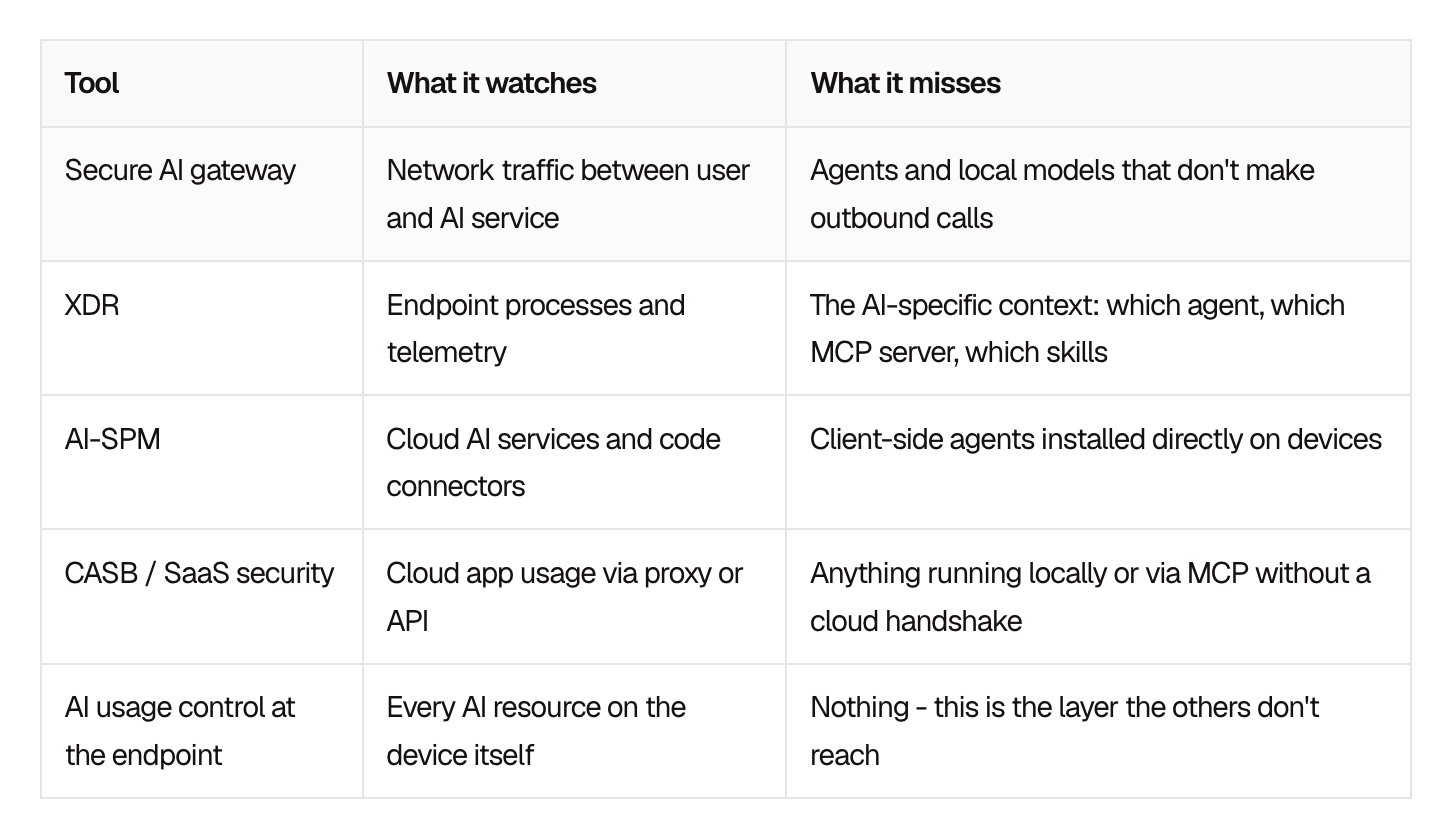
Most security stacks were built to watch somewhere else. The table compares the three tools security teams already run that sit closest to this problem.
AI Usage control at the endpoint table
A developer installs a coding agent. The agent connects to MCP servers that reach source code, tickets, and databases. It downloads skills written by people nobody has vetted. A local model runs with no network call to inspect. All of this happens on the endpoint, where network tools do not read it.
Why Endpoint AI Security Matters Now
Three things have changed at once, and each one raises the stakes on the endpoint.
Agents act on their own
Earlier AI tools answered questions. Agents run commands, read files, call APIs, and interact with other systems using the identity of the person who installed them. A compromised or misconfigured agent can reach whatever that person can reach, with no human in the loop.
The supply chain is wide open
Skills and MCP servers are published and installed in minutes, often from public repositories. Security rarely reviews them before they run. A single malicious skill can give a trusted agent access to data it was never meant to touch.
Regulators ask for proof
The EU AI Act, NIST AI RMF, and ISO/IEC 42001 all expect organizations to know which AI systems they use and to show how they control them. A point-in-time survey or a spreadsheet does not meet that bar. Continuous inventory and enforcement records give you the evidence to show.
In one European insurer, AIBound found 3,572 AI applications and 47 high-risk systems. The insurer was compliant with the EU AI Act 8 weeks before the deadline.
How to Get Started
Getting started does not require a long project or new infrastructure. A practical sequence:
Connect what you already run. Use your existing UEM or MDM to reach managed devices, rather than deploying new infrastructure.
Build the inventory. List every agent, MCP server, skill, model, and app in use, and who is using it.
Grade the risk. Score each resource on evidence so the team can focus on the handful that matter most.
Stop the high-risk ones. Set policy for what is allowed, what needs approval, and what is blocked, and enforce it in real time.
Feed the evidence to GRC. Send records to the governance program you already have, mapped to the frameworks you report against.
AIBound, an Enterprise AI Security Platform, does this through the UEM or MDM you already run. It stops the high-risk AI in real time, with a full AI inventory within 24 hours, every AI resource graded A to F, and no new agents.
Frequently Asked Questions
What is AI Usage Control (AIUC) at the endpoint?
AI Usage Control (AIUC) at the endpoint is the practice of discovering, grading, and stopping the high-risk AI running on employee devices, including agents, MCP servers, skills, and local models. It applies Gartner's AI Usage Control definition at the endpoint, where agents, MCP servers, and skills run.
How is endpoint AI security different from a secure AI gateway?
A gateway reads network traffic between users and AI services. It cannot look inside an AI agent on an endpoint, see which MCP servers it connects to, or inspect skills it has downloaded. Endpoint AI security works at the device level, covering the resources that never produce a network call the gateway can read.
How is AI Usage Control different from DLP or an acceptable use policy?
An acceptable use policy says what staff may do with AI. DLP watches for sensitive data leaving. AI Usage Control at the endpoint finds the agents, MCP servers, and skills installed on the device, grades them, and stops the high-risk ones, so it complements both. Keep your DLP and your policy, and add the inventory.
Do we need new infrastructure to get started?
No new infrastructure. AIBound goes out through the UEM or MDM you already run, the same way you push any other app, with no network taps and no rip-and-replace. A full AI inventory is available within 24 hours. Discovery is read-only, and enforcement starts when you authorize it.
What is shadow AI, and why does the endpoint matter?
Shadow AI is AI that employees use without IT or security approval. Some of it is installed directly on devices rather than reached through sanctioned cloud services. Endpoint-level discovery finds AI that never crosses the network, which is where network tools do not read it.
How does this help with the EU AI Act?
The EU AI Act expects organizations to know which AI systems they use and to show how they control them. A continuous endpoint inventory, risk grades, and enforcement records give your GRC program the evidence that regulators ask for. The same evidence maps to NIST AI RMF and ISO/IEC 42001.
Take Control of the AI on Your Endpoints
You cannot control AI you have not found, and much of today's AI only shows up on the endpoint where it runs.
Security teams that find every agent, MCP server, and skill, grade them on evidence, and stop the risky ones in real time keep the productivity benefits of AI without handing over control. The evidence they collect along the way is what regulators will ask for next.


%401x.png)